Guide · For small businesses

Find the products that are
quietly losing you money

Supplier costs move through the season. Price lists do not. The gap never shows up in a day’s takings — it shows up six months later, in a category that used to pay for itself. Here is how to get it out of your own till export in about three minutes.

A run that ships inside the app

Maple Street Market

This file is already in the free app. Press play and these exact numbers come out.

Small business

Maple Street Market

Six months of till data — 3,165 sale lines, no accountant on staff.

Cooking oil The other five shelves
break even 29–33% 15.7% −5.5% January June
Its price list was never revised while the supplier’s cost rose all season.
The numbers behind this chart
ShelfJanuaryJune
Cooking oils15.7%−5.5%
Household29.1%29.1%
Pantry30.4%30.5%
Personal care30.7%30.6%
Dairy & bakery30.8%31.3%
Snacks & drinks31.9%32.7%

Cooking oil made $141.11 in January and lost $53.83 in June.

  1. NoticedEvery one of 3,165 sales carries a customer’s phone number in plain view — and a live payment key, left behind when a card reader failed to sync.
  2. AnsweredThat shelf made $141.11 in January and lost $53.83 in June. Its price never moved while the supplier’s cost rose all season.
  3. Kept upNext month’s export arrived with a column renamed and another added. It matched the rename itself and left the unfamiliar one alone rather than guess.
  4. MovedThe billing software a local vendor installed in 2012 can finally be read — six sets of records listed, and what a technical person needs to move them.
What it tells the owner to do: raise the cooking oil prices. About 6% gets back to break-even, about 25% restores January’s margin — check what nearby shops charge first.
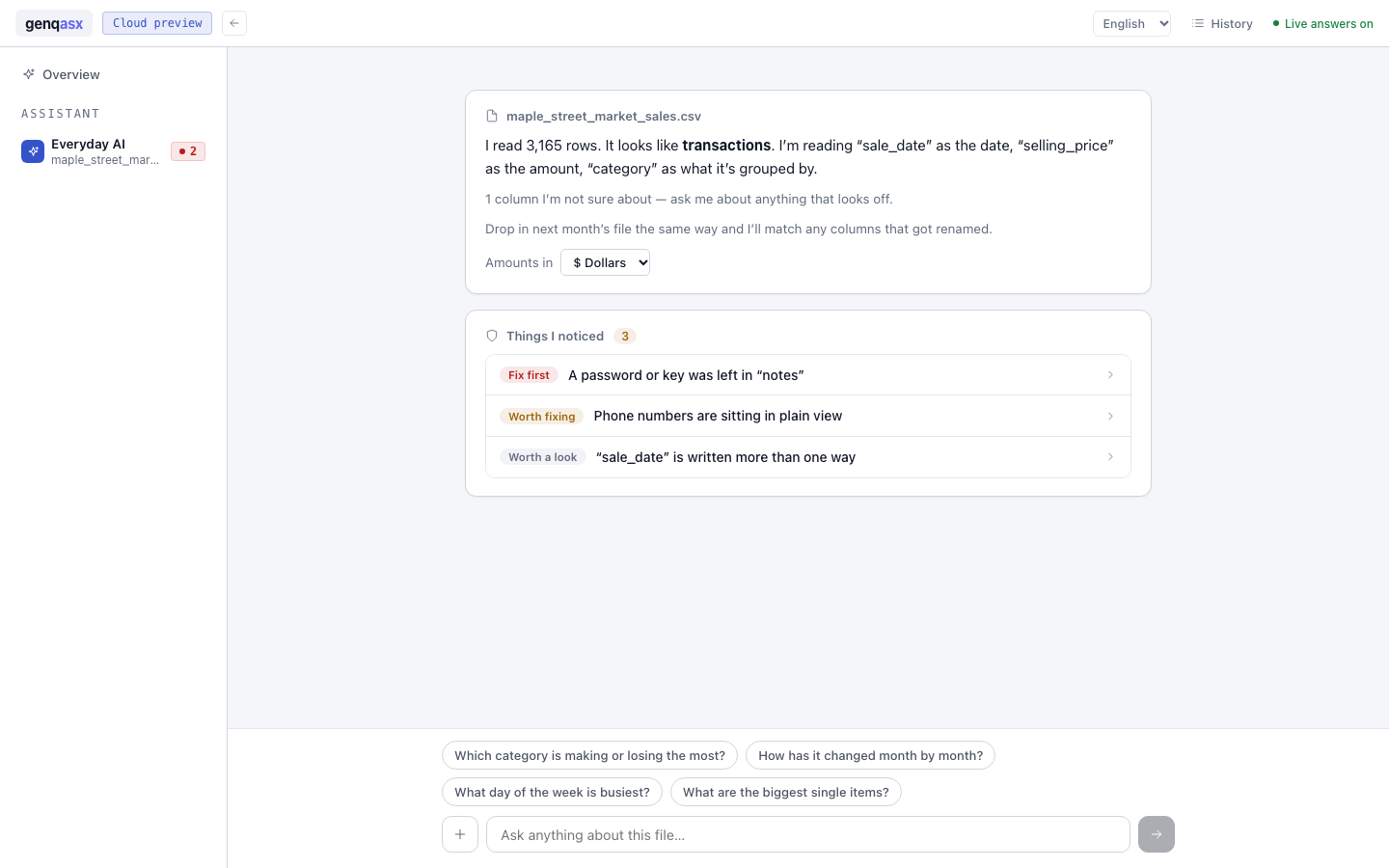
The Everyday AI screen after Maple Street Market’s till export is read: 3,165 rows understood as transactions, and three things noticed — a password or key left in a notes field, phone numbers in plain view, and dates written more than one way.
Not a mockup — this is the screen after dropping that export in, before anyone asks it anything.
Step by step

Do it with your own till export

Five steps, about three minutes. No accountant and no spreadsheet formulas.

1
Export the sales

Six months out of your till or billing software, as CSV or Excel. Date, product, category, cost price, selling price and quantity is all it needs — extra columns do no harm.

2
Open the app

It runs in a browser tab. Nothing to install, no account, no card.

3
Ask the question you actually have

“Which product category is actually losing us money right now?” — in your own words, not in a formula.

4
Read the plan before it runs

It says how it will handle your dates when they are in two formats at once, how it computes margin, and which months it is comparing. Accept it, and the numbers come back with the rows behind them.

5
Scan the same file for what else is in it

It does this the moment the file is in, without being asked: customer numbers collected at the counter, credentials left in notes fields, and columns that have quietly changed shape.

While it is in there

What else a till export is carrying

The margin answer is what you came for. These come out of the same pass over the same file.

Customer numbers from the loyalty card

Every one of 3,165 sale lines carried a customer’s phone number. Hand that file to a supplier or an accountant and every one of them goes with it.

A password sitting in a notes column

A live payment key, left behind in three rows when a card reader failed to sync and dumped its raw response into the notes field. Nothing about the file looks unusual.

Dates in two formats at once

In this file, 385 rows — one in eight — used the other format. That is the thing that silently ruins a month-on-month comparison done in a spreadsheet.

Before you open anything

Where the file actually goes

Short version: nowhere. The longer version is worth reading before you hand any app a statement.

It is read inside your own browser tab. The database engine runs there, in the page, on your machine. The file is never uploaded to us or to anyone else.
The part that writes the query also runs on your machine, by default — a local model on your own computer, not a service somewhere.
The app downloads from this site like any website the first time you open it, and so does the database engine it runs on — both from genqasx.com, and nowhere else. Nothing is fetched from a third party, and your file is the one thing that does not travel.
Every run is written to a log on your machine, so you can go back and see exactly what was done to the file and when.

There is no account, so there is nothing for us to hold. The privacy page says what the website itself collects, which is almost nothing.

Questions

Before you ask

Do I need an accountant to read the output?

No. It gives you the category, the margin then and now, the money involved, and a specific thing to do about it — in the Maple Street run, about 6% to break even and about 25% to restore January. What it does not do is decide for you.

My export has mixed date formats. Does that break it?

No, and it will tell you about it. Mixed formats, missing values and renamed columns are flagged in the plan before anything runs, so you can see how they are being handled rather than finding out afterwards.

Does my sales data get uploaded anywhere?

No. It is read inside your browser tab, on your own machine. No account, no upload, nothing held by us.

Will it set the new price for me?

It recommends a range and shows the working behind it. Setting the price is a judgement about your street, your customers and the shop next door, and that stays yours.

What does it cost?

Nothing today — it is free while it is in early access, with no card and no account. When billing opens it is $19 a month with the first fourteen days free, and the pricing page says plainly what that does and does not buy.

Your till export is already sitting there

Open it in the app and ask which shelf is costing you money. Free in early access, no card, and the file stays on your machine.

Looking at a household statement instead? The same assistant reads it the same way — find the subscriptions you are still paying for.