Guide · For households

Find the subscriptions you’re
still paying for

They arrive one at a time — a trial here, a kid’s app there — and nothing ever cancels them. No single month ever looks wrong, which is exactly why nobody catches it. Here is how to get the list out of your own statement in about three minutes, without the file leaving your machine.

A run that ships inside the app

The Parker family

This file is already in the free app. Press play and these exact numbers come out.

Household

The Parker family

Eighteen months of bank statements — 725 transactions, never looked at as a whole.

First three months Latest three months
Subscriptions $30 $181 +495% Shopping Groceries $854 → $865 Dining out Transport $500 a month
Three services quietly became nine, and not one was ever cancelled.
The numbers behind this chart
CategoryFirst 3 monthsLatest 3 months
Subscriptions$30.47$181.42
Shopping$255.11$272.94
Groceries$854.09$865.29
Dining out$311.23$297.74
Transport & fuel$266.04$237.39

Monthly averages. The mortgage and the savings transfer are left out — both are fixed by design.

  1. NoticedThe gym’s direct debit fired twice on 2024-11-09 — $39.99 taken twice, same day, same billing cycle — and the account’s phone number sits on all 725 rows.
  2. AnsweredGroceries, dining, shopping, transport: all flat. Subscriptions: up 495%.
  3. Kept upThe bank refreshed its statement format and the renamed column was matched up on its own, instead of quietly breaking the comparison.
  4. MovedEight years of history stuck in a desktop budgeting app, on a laptop about to be replaced — everything it keeps, listed in one place.
What it tells the family to do: check whether anyone still uses the four newest — Meal Kit Box, Kids Learning App, Photo Backup and Disney+. Cancelling all four keeps $95.97 a month, about $1,151.64 a year.
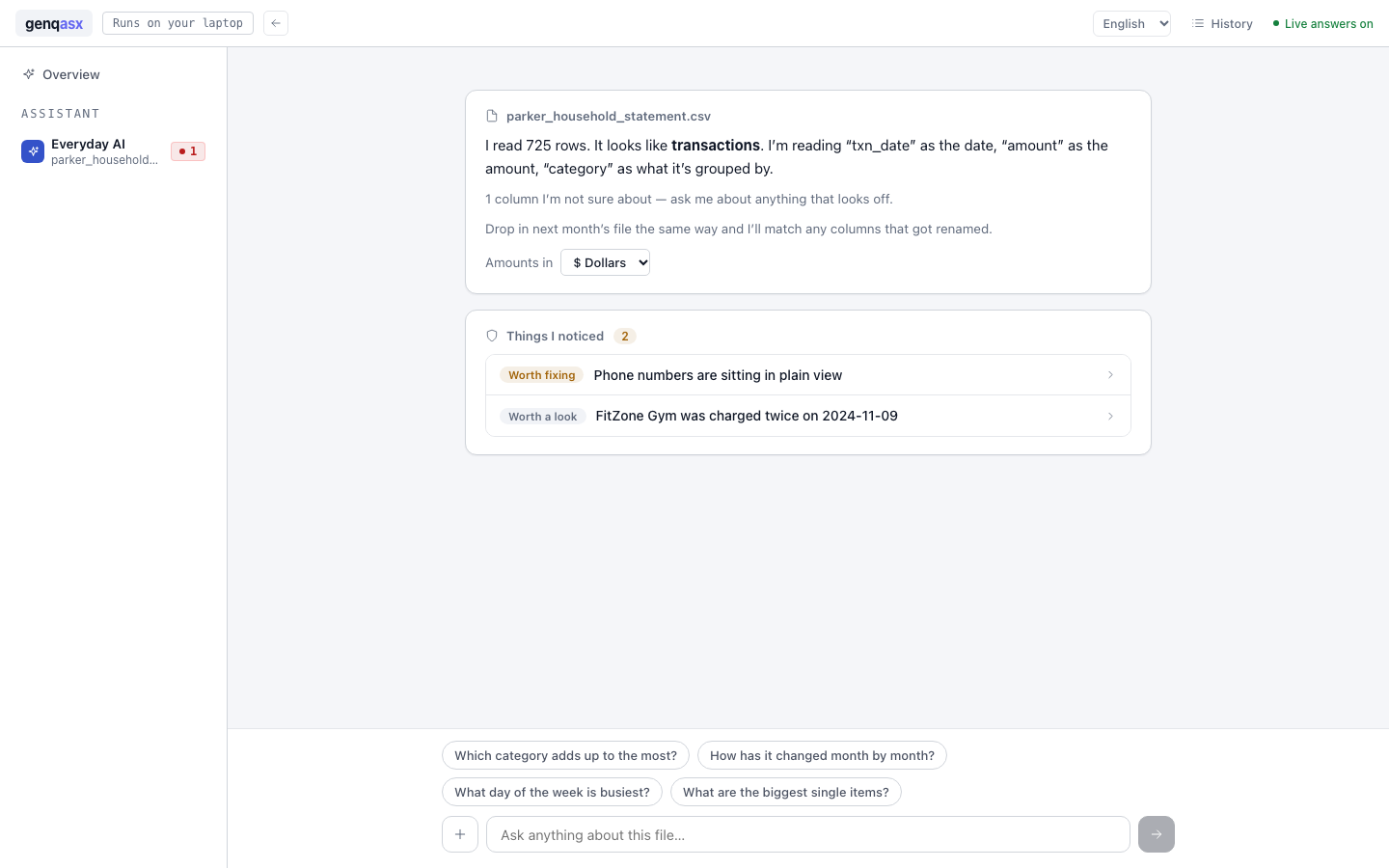
The Everyday AI screen after the Parker household statement is read: 725 rows understood as transactions, and two things noticed — phone numbers in plain view, and FitZone Gym charged twice on 2024-11-09.
Not a mockup — this is the screen after dropping that statement in, before anyone asks it anything.
Step by step

Do it with your own statement

Five steps, about three minutes. Nothing to install and no account to make.

1
Export it

Download a statement from your bank or card account — CSV or Excel, both work. Eighteen months shows the drift clearly; six is enough to see a trend.

2
Open the app

It runs in a browser tab. There is nothing to install, no account to create, and no card.

3
Ask in your own words

Type the question you actually have: “Where has our spending actually grown over the last year and a half?”

4
Read the plan before it runs

It writes out what it is about to do — which columns, which months, what it is leaving out and why — then waits for you. Accept, and the answer comes back with the rows behind it.

5
Scan the same file for the other thing

It does this part without being asked, the moment the file is in: a charge that ran twice, a number sitting in the clear, a column that changed shape mid-year.

While it is in there

What else is hiding in a statement

A spending trend is the obvious thing to look for. These are the ones that only turn up because something is reading every row.

A charge that ran twice

In the Parkers’ file, the gym’s direct debit fired twice on one day — $39.99 taken twice. The month’s total still looked completely normal, which is why nobody went looking.

Your phone number, in the clear

All 725 rows carried the account’s phone number unmasked — exactly what someone trying to pass themselves off as the account holder goes looking for.

The format changing under you

The bank refreshed its statement format halfway through. The renamed column was matched up on its own, instead of quietly breaking the comparison.

Before you open anything

Where the file actually goes

Short version: nowhere. The longer version is worth reading before you hand any app a statement.

It is read inside your own browser tab. The database engine runs there, in the page, on your machine. The file is never uploaded to us or to anyone else.
The part that writes the query also runs on your machine, by default — a local model on your own computer, not a service somewhere.
The app downloads from this site like any website the first time you open it, and so does the database engine it runs on — both from genqasx.com, and nowhere else. Nothing is fetched from a third party, and your file is the one thing that does not travel.
Every run is written to a log on your machine, so you can go back and see exactly what was done to the file and when.

There is no account, so there is nothing for us to hold. The privacy page says what the website itself collects, which is almost nothing.

Questions

Before you ask

Do I have to upload my bank statement somewhere?

No. The file is read inside your own browser tab and the work happens on your machine. There is no account, no upload and no copy of it anywhere else — the only answer we would accept for our own statements.

Which banks does it work with?

Any of them, as long as you can export a statement as CSV or Excel — which every bank and card issuer offers under “download statement”. It reads the columns it finds rather than expecting a particular bank’s format.

What if the dates or columns are a mess?

That is the normal case. Mixed date formats, renamed columns and half-empty fields all get called out in the plan — it tells you what it is unsure about instead of guessing quietly and handing you a confident wrong number.

Can it cancel the subscriptions for me?

No, and it should not be able to. It finds them, names them and totals them up; cancelling is yours to do, from the apps themselves.

What does it cost?

Nothing today — it is free while it is in early access, with no card and no account. When billing opens it is $19 a month with the first fourteen days free, and the pricing page is straight about what that does and does not buy.

Your statement is already on your laptop

Open it in the app and ask where the money has gone. Free in early access, no card, and the file stays where it is.

Running a shop rather than a household? The same assistant reads a till export the same way — find the products that are losing you money.